What does an achievement system need from its badges?
More than one picture per achievement. A player sees a badge before they earn it (locked), sometimes without knowing what it is (hidden), and often in levels (bronze, silver, gold). Each platform also wants its own size and format. Drawing every state by hand multiplies the work by five. The badge maker draws each achievement once and makes the other states from that drawing.
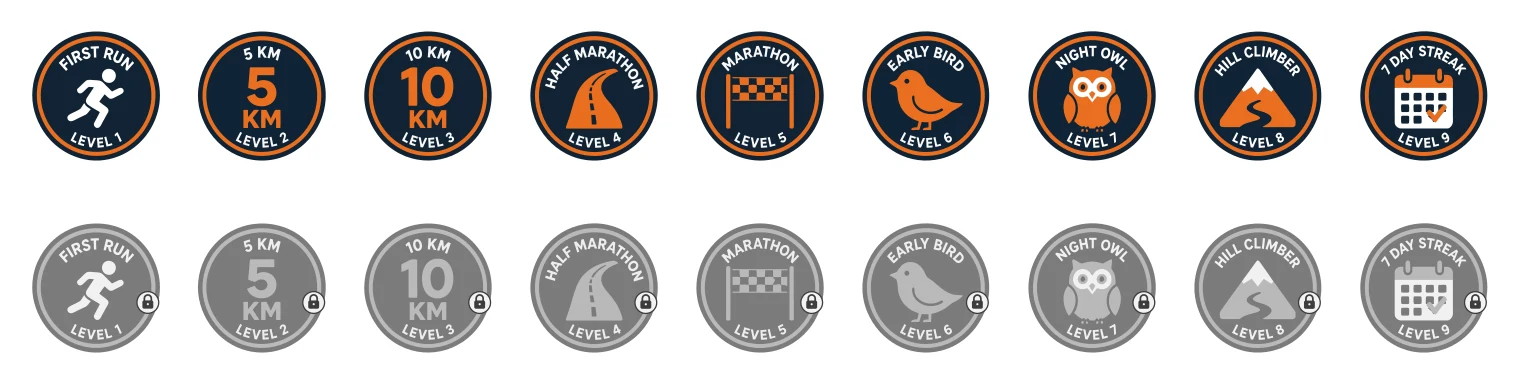
Our example run club set: nine badges from one list, earned (top) and locked (bottom). The locked versions were made from the same drawings, not drawn again.
How do I make a badge set?
Open the AI logo generator and choose Badges, then A set.
- List the achievements, one chip each:
first run, 5 km, 10 km, half marathon, marathon, early bird. A set can grow to 36 badges. - Choose the bottom line. None, Level 1, 2, 3… in list order, or the same words on every badge (a club name, a year). The achievement's name goes along the top.
- Choose a look. Bold, Line or Retro, plus up to 300 characters of style in your own words and up to three colours: "bold, sporty, navy and orange".
- Send. The price of a new set is printed on the button first.
For a single badge, a club crest or a "Est. 2024" seal, choose One badge and type the middle, the top line and the bottom line yourself.
Is the lettering spelled the way I typed it?
The words are lettered as part of the drawing, and the drawing is asked for them exactly as typed. Look at every badge before you download, since a letter can still come out wrong. Short lines read best: the top line holds up to 40 characters and the bottom line up to 30, but two or three words fit the curve far better than a sentence. If a word comes out wrong, redo that badge in a round with a note ("top line: HALF MARATHON HERO"), and the rest of the set stays as it is. Before the set is drawn, words that look like a brand or product name are shown back to you to confirm that you may use them.
What versions of each badge do I get?
| Version | What it looks like | Typical use |
|---|---|---|
| Earned | the badge as drawn | unlocked achievement |
| Bronze, Silver, Gold, Platinum | the ring and lettering recoloured in the metal, flat or with a light shine | levels of one achievement |
| Locked | a compressed grey version with a padlock on the ring | not yet earned |
| Hidden | the grey badge faded under a large question mark | secret achievement |
The tiers recolour whole shapes of the ring by their role (outer ring, rim, band, letters), and keep the letters readable against the band. The picture in the middle keeps its colours, so the achievement still reads at a glance.
Which files does each platform get?
| Download | Files |
|---|---|
| Web & app | one SVG per badge and version, PNGs at 64, 128, 256 and 512 px, a sprite.svg and a badges.json listing every file and word |
| Steam | 256 × 256 JPGs in achieved/ and unachieved/ (the locked version), as Steamworks asks |
| Game Center | 1,024 × 1,024 PNGs |
| Google Play | 512 × 512 PNGs under 1 MB (Google greys locked achievements itself) |
| Twitch | subscriber badges at 18, 36 and 72 px, each under 25 KB |
| Discord | 64 × 64 role icons under 256 KB |
| Open Badges | square PNGs of at least 600 px under 256 KB, for credentials |
| 300 DPI PNGs and SVGs in millimetres, from 2 to 10 cm across |
Each download is checked against its platform's limits when it is built. Platform rules change; the table reflects them as checked when this guide was written.
How do I show them in my app?
Use the badges.json from the web download as your mapping: each entry names the achievement, its top and bottom words and the file of each version. Show the earned SVG when the player has it, and the locked one otherwise. SVGs stay sharp on every screen density. Use the PNGs where an engine or a store asks for bitmaps. Ring text is easy to read from 128 px up. Below that, a badge reads by its picture and colour, so keep the middle simple and give each badge in a set a different subject.