What makes an icon set look like one set?
Icons belong together when they share a grid, a stroke weight, corner treatment, a level of detail and a palette. Mixing icons from different packs, or generating them one prompt at a time, usually breaks at least one of these. The icon set generator draws every icon of a set in one sheet, from one description of the style, so the drawing choices are made once for all of them. Each icon is then cut out and traced into its own SVG.
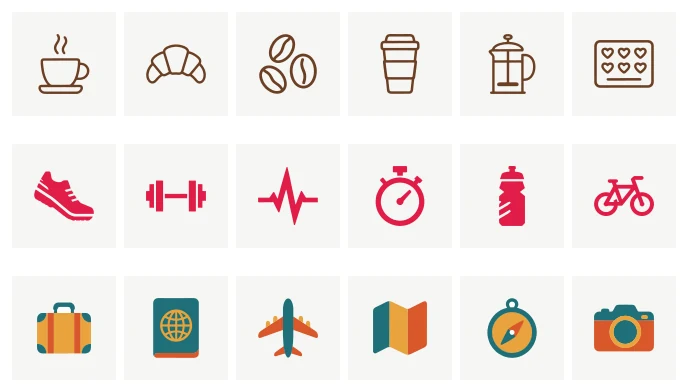
Three of our example sets, each from one list: a café app in Line, a fitness tracker in Filled with sharp corners, and a travel app in Flat colour with three colours.
How do I make a set?
Open the AI logo generator and choose Icons. The studio's heading changes to the icon set generator.
- List the icons. Type the things you need, separated by commas or one per line:
cup of coffee, croissant, map pin, loyalty card. Each becomes a chip. A set holds up to 25 icons. - Choose how they are drawn. Line is outlines of one weight, Filled is solid shapes in one colour, Flat colour is solid shapes in up to three colours, and Like this image follows the look of an image you upload (signed in) or of a logo or icon set you already made.
- Pick the corners. Rounded or sharp.
- Describe the style in words, if you like. Up to 300 characters, for example "friendly and minimal, rounded ends, a little hand-made warmth". This sentence goes into the drawing of every icon in the set.
- Send. Each tile shows its icon being traced, then the finished SVG.
The price of a new set is printed on the button before you send it; nothing is charged for a set that fails.
How do I fix one icon without redrawing the rest?
Use a round. In a round you can redo icons with a note ("a plain rolled-up mat, no texture") and add new ones, up to nine changes at a time. Redone and added icons are drawn in the style of the set, so they keep matching. The first rounds of a set are included; when a round costs credits, its button says so before you start it.
If a single detail is off and redrawing would be overkill, open the icon in the SVG editor and change the path or colour directly.
What is in the download?
The ZIP has three parts:
| Folder | What it holds |
|---|---|
svg/ |
one SVG per icon, viewBox="0 0 24 24" with 2 px padding |
png/ |
each icon as a transparent PNG at 16, 24, 32, 48, 64, 128, 256 and 512 px |
sprite.svg |
every icon as a <symbol> with the id icon-NAME |
The small PNGs (up to 48 px) are drawn at their own size, so lines land on whole pixels instead of being shrunk from a large image. Larger sizes are scaled from 512 px.
How do I use the icons on a website?
For a Line or Filled set, the SVGs draw in currentColor, so an icon takes the text colour around it. You recolour it with CSS instead of editing files:
<button class="icon-button">
  <svg width="24" height="24" aria-hidden="true"><use href="sprite.svg#icon-cup-of-coffee"/></svg>
  Order
</button>
.icon-button { color: #6b3f24; }
.icon-button:hover { color: #1f2937; }
Choose As designed in the download dialog if you would rather have the ink written into each file. A Flat colour set always keeps its own colours. Mark decorative icons aria-hidden="true", and give an icon that stands alone as a button an accessible name.
What lists work best?
Concrete, drawable nouns work best: "bicycle", "stopwatch", "door lock". Abstract words ("growth", "trust") give the generator nothing specific to draw, so turn them into an object first ("a sprout", "a handshake"). Keep one level of detail across the list. A set that mixes "dot" with "city skyline" will look uneven however it is drawn.
Before you ship, check every icon at 16 and 24 px next to text, check contrast against your backgrounds, and confirm that similar icons stay distinct. A generator does not check whether an icon resembles someone else's mark, so review any icon you plan to register as a trademark.