Why recolor the SVG instead of the PNG?
In a PNG, color is spread over thousands of pixels, anti-aliased edges included, so changing it means painting. In an SVG made of filled paths, a color is a value on each shape: change the value, and every edge stays exactly where it was. That is why a brand's second palette, a dark-mode version or a one-color print version should be made from the SVG.

How do I recolor one part?
Open the file in the SVG editor. A traced image opens with each object as its own layer; inside it, the shapes are nested by what encloses what (an eye inside a face).
- In the Layers tab, every row shows its colors as small swatches: one for a single-color shape, several side by side for a group.
- Click a swatch. A picker opens next to it with fixed colors, the drawing's own colors, a hex field and an eyedropper.
- Point at a color to preview it on the canvas. Clicking applies it to every fill inside that row (the whole layer, the group or the one shape) as one undo step. Esc puts the old color back.
A row with several colors can be made one color, or have just one of its colors changed. To select something on the canvas instead: a click takes the whole object, a double-click goes inside it, and the context bar over the canvas shows where you are ("Drawing › Object 2 › Shape"). One click there steps back out.
How do I change one color everywhere?
Use the Colours tab. It lists the drawing's palette. Clicking a swatch selects every shape that uses it, so you can see where the color lives, and Change it everywhere replaces it throughout the drawing in one undo step.
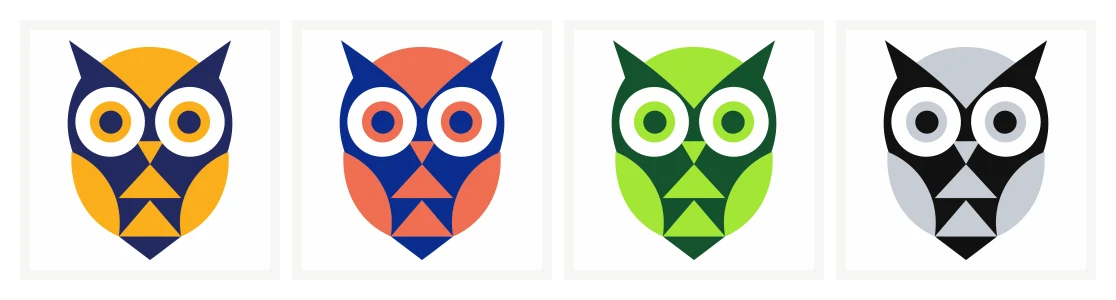
One of our example logos, recolored by changing its two colors everywhere. Every shape and edge is unchanged; only the two fill values differ.
The same tab holds the selection's fill and stroke (with an eyedropper to pick a color from the canvas) and, for a rectangle, its corners. Position, size, arrange, align and the grid are under More.
How do I make a one-color version?
Use Change it everywhere for each color in turn, setting all of them to the same ink. Or select everything and use the selection's fill. Then look for shapes that only showed because of their color: an eye that was white on a dark face disappears when both become black. Delete those shapes, or keep them a second color, such as the paper color, so the drawing still reads.
How do I check the result?
- Contrast. Text and small details need enough contrast with what they sit on. WCAG asks for at least 4.5:1 for normal text.
- Small sizes. Export a PNG at 32 and 64 px from the editor and look at it at that size, not zoomed in.
- Dark backgrounds. A logo built for white often needs a lighter version of its darkest color on a dark page.
Saving and exporting
Save keeps a new version of the SVG in your account, and earlier versions stay available. Export PNG renders the drawing at a width you choose, from 16 to 4,096 px. Unsaved changes are kept as a draft in your browser and offered back next time you open the same file. The editor needs an account. Files in it, edited versions included, are kept for your account's storage period, which is shown on each file.