Should I trace my sketch or redraw it?
Ask whether the lines on the paper are the final lines.
- Trace it when they are: hand lettering you like, a signature, a stamp, a finished ink drawing. Tracing keeps exactly your strokes, wobble included, and turns them into vector paths.
- Redraw it when the sketch is an idea: a rough layout, a doodle on a napkin, an arrangement of shapes. A generator can keep the composition and draw it cleanly, in a style and colors you describe.

How do I trace a sketch exactly?
- Photograph it flat in daylight, straight above the paper, filling the frame. No shadow of the phone and no angle. A scan is even better.
- Upload the photo to the PNG to SVG converter (HEIC from an iPhone is fine) and choose Line art / Stencil: ink on light paper, black and white only.
- Check the preview at a large zoom. Pencil grain and paper texture can come back as specks. Thicker ink lines trace more cleanly than pencil, so go over the sketch with a felt pen before you photograph it.
- Unlock the SVG, then fix stray specks or close gaps in the SVG editor.
How do I turn a rough sketch into a finished logo?
Use it as a reference in the AI logo generator:
- Sign in, press + next to the description and choose Upload an image (PNG, JPG, WebP or HEIC). Or pick one of your own earlier logos to refine.
- Describe the logo as well. The image says where things go; the words say what they are and how they look: "a mountain peak with a rising sun and a winding trail, for a hiking club, forest green".
- Send. You get four ideas built on your sketch. Refine the closest in words, then vectorize it.
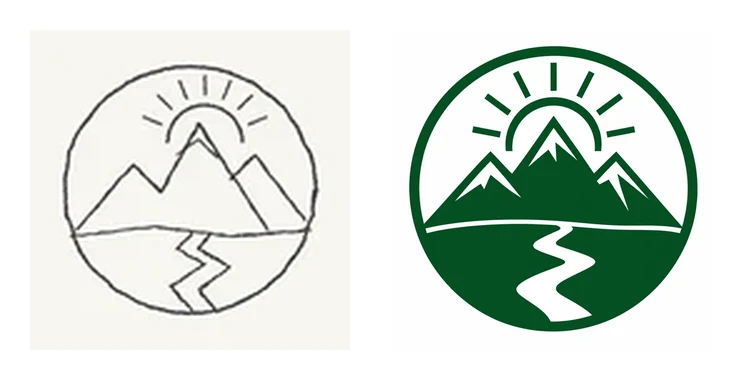
One of our Discover examples: our own quick sketch, and the logo the generator drew from it with the description above.
The image is stored privately in your account, with its metadata (camera, location) removed, and is sent with your request only to draw it. It is scaled to at most 2,048 px, so a phone photo is plenty.
Can a reference set the look of icons, stickers or badges?
Yes, in each of the set modes:
- Icons, "Like this image": the set is drawn in the look of your image or of a logo or icon set you already made. Use it to make icons that match an existing brand. See matching icon sets.
- Stickers, A character: draw your own character (a mascot sketch, a drawing of your pet's cartoon) and the pack is drawn from it. See sticker packs.
- Badges: a badge set can start from an image too, such as an existing club crest whose style the set should follow.
Can I use someone else's image as a reference?
Only an image you have the right to use. A reference steers the drawing, and the result can come out close to it. Starting from another company's logo or a copyrighted character is how you end up with a logo you cannot register or use. A sketch you drew yourself, your own earlier artwork or a photo you took is a safe start. Before you register the result as a trademark, search the registers for similar marks.